Epson 2200 User Manual Page 59
- Page / 106
- Table of contents
- BOOKMARKS

- Copyright Notice 2
- Trademarks 2
- Contents 3
- Maintaining Your Printer 57 4
- Solving Problems 73 5
- Requirements and Notices 85 5
- Index 93 5
- Welcome! 7
- About PRINT Image Matching 8
- About Your Software 9
- About Your Documentation 10
- Launching the Movies 11
- Launching the Manual 12
- Printer Buttons and Lights 13
- 8 Welcome! 14
- Loading Paper 15
- Loading Special Paper 16
- Loading Envelopes 17
- Loading Roll Paper 18
- Loading Paper 13 19
- 14 Loading Paper 20
- 16 Loading Paper 22
- 0.4-inch 23
- 18 Loading Paper 24
- Printing From Start to Finish 25
- Basic Printing in Windows 26
- Page Setup 28
- EPSON Monitor3 from the 33
- . (period) key 33
- Print to print your document 36
- Advanced (OS 8.6 to 9.x) 36
- 6. OS X: Click Print 37
- Printing on Roll Paper 38
- Premium Semigloss Photo Paper 39
- Premium Glossy Photo Paper 39
- Borderless box 39
- Size setting 40
- OK or Print 40
- Macintosh OS X 41
- Select the same Roll 42
- Paper setting here 42
- Macintosh 8.6 to 9.x 43
- Removing Your Printed Photos 45
- Using PRINT Image Matching 47
- Using Film Factory 48
- ■ Premium Luster Photo Paper 50
- ■ Premium Glossy Photo Paper 50
- Borderless setting here 52
- File > Print 54
- Settings 54
- Advanced button 54
- Advanced Settings button 55
- Creating Your Custom Profile 56
- Print button 58
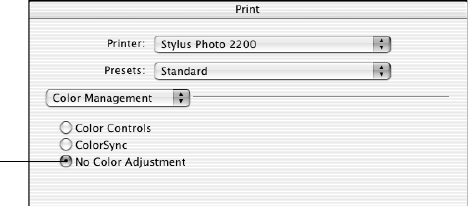
- No Color Adjustment 59
- Print to print your photo 59
- File > Print with Preview 59
- Profile list 60
- Maintaining Your Printer 63
- 58 Maintaining Your Printer 64
- H ink lights 64
- H ink lights flash 64
- Replacing an Ink Cartridge 65
- Checking the Ink Supply 66
- Purchasing Ink Cartridges 66
- Ink Cartridge Precautions 67
- 62 Maintaining Your Printer 68
- Cartridge 69
- 64 Maintaining Your Printer 70
- Macintosh OS X 10.x 70
- Aligning the Print Head 71
- 66 Maintaining Your Printer 72
- Maintaining Your Printer 67 73
- Cleaning the Printer 74
- Cleaning the Interior 75
- Transporting the Printer 76
- Maintaining Your Printer 71 77
- 72 Maintaining Your Printer 78
- Solving Problems 79
- Diagnosing Printer Problems 80
- Running a Printer Check 81
- Problems and Solutions 82
- Printer Problems 83
- Quality Problems 84
- Paper Problems 86
- Miscellaneous 87
- Problems 87
- Software 88
- Where To Get Help 89
- 84 Solving Problems 90
- Requirements and Notices 91
- Important Safety Instructions 92
- FCC Compliance Statement 94
- Declaration of Conformity 95
- ENERGY STAR Compliance 95
- 90 Requirements and Notices 96
- 92 Requirements and Notices 98
- 96 Index 102
- 98 Index 104
- Enhanced Matte Paper 105
- Premium Luster Photo Paper 105
- Velvet Fine Art Paper 105
- EPSON Ink Cartridges 105
- EPSON Papers 106
Related products and manuals for Printers Epson 2200
 (193 pages)
(1 pages)
(1 pages)
(4 pages)
(100 pages)
(52 pages)
(4 pages)
(4 pages)
(4 pages)
(4 pages)
(91 pages)
(26 pages)
(149 pages)
(53 pages)
(4 pages)
(4 pages)
(4 pages)
(16 pages)
(4 pages)
(193 pages)
(1 pages)
(1 pages)
(4 pages)
(100 pages)
(52 pages)
(4 pages)
(4 pages)
(4 pages)
(4 pages)
(91 pages)
(26 pages)
(149 pages)
(53 pages)
(4 pages)
(4 pages)
(4 pages)
(16 pages)
(4 pages)
© 2020, manymanuals.com. All rights reserved. | 0.052 s |
 Manymanuals.com
 Manymanuals.de
 Manymanuals.fr
 Manymanuals.it
 Manymanuals.pl
 Manymanuals.cz
 Manymanuals.es
 Manymanuals-pt.com
Comments to this Manuals